
• Object ID: 00000018WIA30CF2C80GYZ
  • Topic ID: id_2036307 Version: 1.1
  • Date: Feb 1, 2022 6:22:47 PM

ECG patient setup

Before you begin

Gather these items:
  • Abrasive gel, such as NuPrep
  • Cotton swabs or gauze pads
  • MR-approved electrodes, such as:
    • E8819RB MRI Quadtrode Electrodes
    • E8819RF Vermed Medical 1004-5 Series ECG Electrodes
    • E8819RG ConMed Cleartrace ECG
    Note: Check the expiration date of each electrode before use. Do not use expired electrodes.
  • ECG lead connector
  • Respiratory bellows connector
  • Square pad, to use between patient and cardiac leads

About this task

For a successful cardiac MR exam, you must correctly prepare the patient and place the leads. If you do not, your scan may result in inadequate triggering, artifacts, and compromised image quality.

For more information, see Set up the ECG gated exam.

Step-by-step instructions

  1. Prepare the patient for lead placement.
    1. Shave the chest if necessary.
    2. Scrub the area where the electrodes will be placed to remove any dead skin. This improves the cardiac signal and reduces noise.
    3. Apply an abrasive gel (such as NuPrep) to a cotton swab or gauze and rub lightly on the skin where the electrodes will be placed.
    4. Remove excess gel when done cleaning.
  2. Position the ECG leads.
    1. Place and secure the respiratory bellow.
    2. If desired, attach the peripheral gating line.
    3. From the operator console, in the Footer area, click the Gating, Fan, Light icon ().

      Result

      The Gating Control screen appears.
    4. On the Gating Control screen, select Cardiac Gating in the Waveform Display area.
    5. Select Standard Gating Mode below Cardiac Gating Selection.
      Note: In Standard Gating mode, you can only show one ECG waveform at a time. Use the radio buttons to select the desired waveform.
    6. Place electrode (1) superior to the apex of the heart.
    7. Place electrode (3) inferior to (1) to create VCGI, as demonstrated by vector (5).
    8. Place electrode (2) and (4) orthogonal to VCGI to create VCGII, as demonstrated by vector (6).
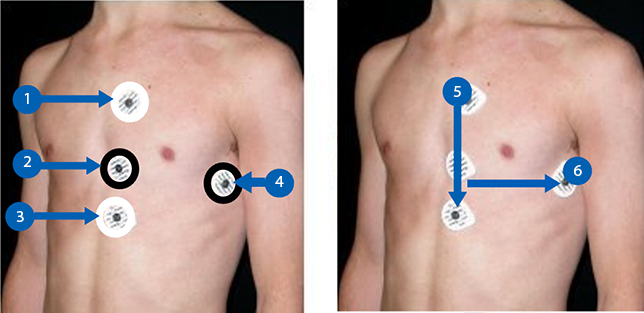
    9. Use the white cardiac lead pair with the white and red clips attached to the electrodes (1) and (3) to create VCGI.
    10. Use the black cardiac lead pair with the green and black clips attached to electrodes (2) and (4) to create VCGII.
      Note:
      • The leads should have slack. If they are pulled too tightly, the ECG trace may become compromised.
      • You can connect the white and black lead pair in any direction if the pairs remain orthogonal.
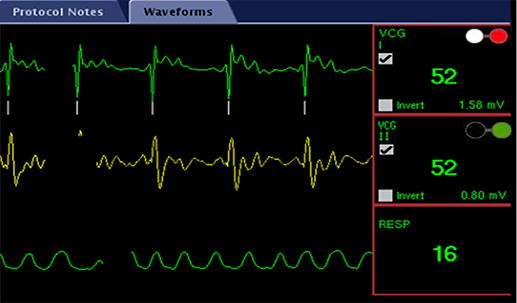
  3. View the in-room display gating screen to verify that all waveforms are green and the amplitude of the VCG trace is 1.0 mV or higher.
  4. Secure each lead wire with tape to keep it flat.
  5. Place padding between the chest and the leads.
    The padding eliminates pressure on the leads from the anterior coils.
  6. Route the ECG cable down the center of the bore.
    Note: Do not loop the ECG cable, and do not allow to touch the coil cable.
  7. Position the anterior coil over the chest, landmark the patient, and advance the table to isocenter.
  8. Tape the ECG splitter to the outside of the bore to prevent movement.
  9. Wait for the gating signal to stabilize, then click the Gating, Fan, Light icon and change to Independent Vector Gating.

    Result

    The waveforms from vector 1 and 2 display on the Waveform screen.
  10. Click Gating Reset to initialize gating and display the trigger marks on the waveform.
    Reset the gating any time that the patient’s heart rate changes substantially, such as during a stress exam. Reset the gating just before you start the MR stress series after the patient has reached the heightened heartrate.
  11. Wait for the gating signal to stabilize after you reset the gating and before you start the examination.
    The entire waveform must be green before you start the cardiac examination. If the waveform is not entirely green, see the troubleshooting tips.