- 00000018WIA3069E770GYZ
- id_400249131.10
- Aug 31, 2022 1:32:45 PM
Footer area
The message and icons in the footer area always appear on the screen.

| Footer area | Description |
|---|---|
 | Message area that displays messages regarding the system status. Click the arrow next to the message to display the error log screen.
The Scan Parameter area also has a Scan messages area that is related to the series in an INRX state. |
 | Click the Gating, Fan, Light controls icon to display the Gating Controls screen for:
|
 | The current date and time are displayed. See System date and time. |
 | The Reconstruction Status area displays the status of the examination, series, and images currently being reconstructed. The most recently reconstructed image is displayed until the next image is ready for reconstruction. |
 | The Job Manager icon displays the network status of the examination, series, and images currently being networked and the destination location. |
 | The Archive/Remove Status area displays the status of the examination, series, and images currently being archived to the primary archive device. The Remove Status simply shows "Removing" or "Removed." The individual exams, series or images are not listed. |
 | The Film Status area displays the status of the examination, series, and images currently being filmed. |
 | Roll the cursor over the icon to display the disk capacity for 256 and 512 images.
The graph displays multiple disk capacity states:
|
 |
|
 | Click to open the Stop Watch screen. See Set count down time on Stop Watch. |
 | Click to open the online help window. To resize the Online Help window, click and drag any edge of the window. To close the Online Help manual, click the X on the browser tab. The next time you open help, it will open to the default page, size, and location. |

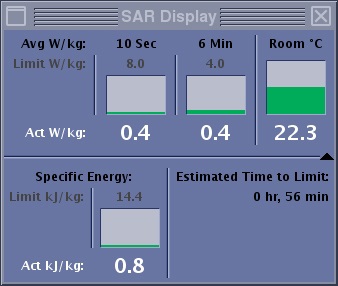
| Click the SAR icon to open the SAR display. |

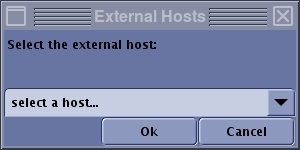
| Click the External Host icon to open the External Hosts screen and select a Guided Focus Ultrasound host from the menu. For details, see the connect to Guided Focus Ultrasound procedure. |
 | This icon displays when a new service pack is available and the MR system is up and operational. For more details, see the remote software download procedure |
  | Click the e-Reporting icon to launch the e-Reporting tool, from which you can view, export or print a report. The icon displays "i" when there are unread reports. |