- 00000018WIA30921870GYZ
- id_400247981.18
- Sep 6, 2022 3:43:21 AM
Respiratory exam
About this task
The Respiratory sensor is a device that detects the motion of the abdominal wall. It is used with the Respiratory Gating/Triggering and Respiratory Compensation Imaging Options to monitor the patient's breathing motion for chest and abdominal scans.
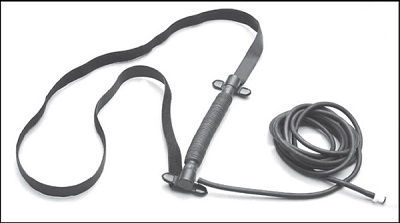
- Respiratory bellows that connect to the PAC.
| CAUTION | |
|---|---|
Step-by-step instructions
- Observe the motion of the patient's chest and abdomen during normal breathing. Put the respiratory device over the area where there is the greatest breathing motion.
Figure 2. Respiratory bellows placement: adjust bellows for the optimum respiratory waveform 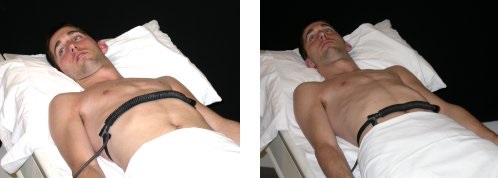
- When using the respiratory bellows, follow these steps.
- Fasten the respiratory bellows with the Velcro® straps.
- Placement of the respiratory bellows should be snug, but stretched as little as possible.
- The respiratory bellows should expand and contract approximately ½ to 1 inch with the patient's breathing.
Figure 3. Expansion of bellows 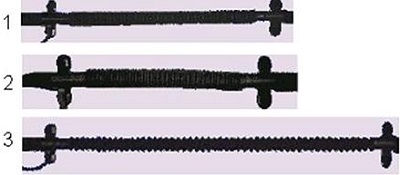
Table 1. Bellows image legend Number Description 1 Respiratory bellows correctly stretched 2 Respiratory bellows too loose; breathing may not be detected 3 Respiratory bellows too tight; breathing may not be detected due to gain set too high - Without bending or kinking the respiratory bellows, route the tubing down the center of the table to the connection ports.
- Once the respiratory device is in place, give the system about 60 seconds to stabilize, then check the respiratory signal.
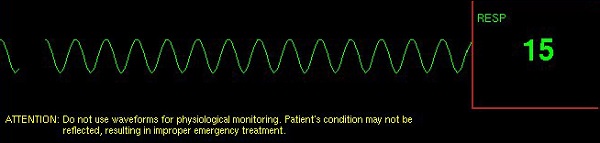
- From the IRD, display the respiratory wave form screen to evaluate the respiratory signal.
Figure 4. IRD Respiratory waveform 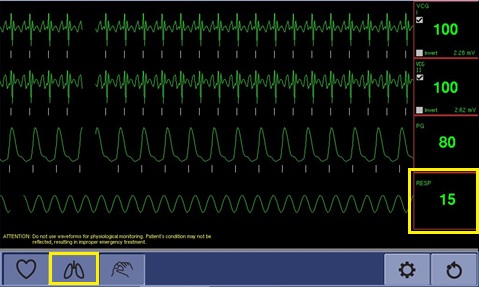
- From the IRD, display the respiratory wave form screen to evaluate the respiratory signal.
- From the operator console, in the Footer area, click the Gating, Fan, Light icon (
 ).
).Result
The Gating Control screen appears. - On the Gating Control screen, select RESP in the Waveform Display area.
- Verify that the trigger marks appear on the waveform.
- The triggers indicate the system is adequately detecting the respiratory pattern. If they do not appear, reposition the bellows.
Figure 5. Respiratory Waveform