

- 00000018WIA30796F80GYZ
- id_400215531.2
- Apr 7, 2022 4:18:30 AM
Dock and undock the table procedure
About this task
Use these steps to dock or undock a mobile table. The table has five pedals, three of which are used to connect (dock) and remove (undock) the table from the magnet.
For details regarding the combined weight of the patient, coils, pads, etc. see Technical specifications .
Important: The table undock powers down the PAC hardware, which stops the physiological waveform display on the system screen Waveform tab and the in-room display Gating tab. The waveform appears as a flatline with no triggers. After the table is docked, the power to the PAC hardware is restored. It takes about 20 seconds for the physiological waveform to appear on the system screen Waveform tab and in-room display Gating tab. A message is displayed on both the Waveform Tab and the Gating tab.
Step-by-step instructions
- To dock the table, follow these steps and refer to the following image.
Figure 1. Brake pedal, 2= neutral pedal, 3 = steer-lock pedal 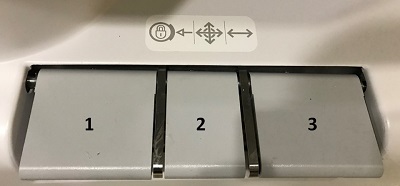
- Remove the brake by stepping on the steer locking caster pedal or the neutral pedal.
- Set the steer locking caster, if necessary.
- Line up the table to the table base and push table towards table base.
- When the connections for the table and table base are close and aligned, step on the
 .
. - Step on the
 to connect the table electronics to the magnet. This engages the touch and go landmark and automatic detection of coils features.
 - When the table is connected to the magnet, raise the table: step on the
 at the table base or at the side of the magnet.
- IMPORTANT: After the mechanical dock but before the electronic dock, it is possible for the table top to move freely, thus resulting in loss of the home position. To recover, engage the electrical dock and then press the Home button on the Magnet control panel.
- To undock the table, follow these steps.
- Remove brake by stepping on the brake/in-line locking caster toggle.
- Set the straight-line locking caster if necessary.
- Step on the
 .
. - At the foot end of the table, pull directly back for a few feet.
- Push the silver transport bar button and pull the transport bar to the Up position. Move the table.
Figure 2. Table transport bar 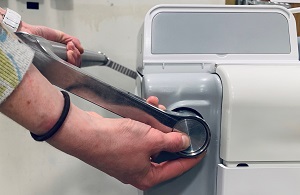
- To avoid pinching fingers or hands between the table and other objects, place your hands on the top of the Table Transport bar when moving the table.