
• Object ID: 00000018WIA30561870GYZ
  • Topic ID: id_40023467 Version: 1.7
  • Date: Aug 29, 2022 7:16:47 PM

Change your password

About this task

Use these steps to change your password.

For more information regarding passwords, see your MR Privacy and Security operator manual.

Step-by-step instructions

  1. From the header area of the screen, click the Tools icon.
  2. From the System Management work area, click the Service Desktop Manager tab.
  3. From the Service Desktop Manager, click Lock Screen Switch User.
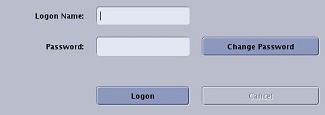
  4. From the Logon screen, click Change Password.
    Figure 1. Button and text box area of logon screen
  5. From the Change Password screen, update your password.
    1. Type your Logon name.
    2. Type your old password.
    3. Type your new password.
    4. Type your new password again to confirm.
  6. Click OK.