- 00000018WIA3058A870GYZ
- id_400255721.4
- Feb 8, 2022 4:23:59 PM
SAR Scout scan
Before you begin
The SAR Scout preference on the System Preference screen must be set to On or Auto. For details, see SAR Scout Preferences.
- From the Exam or System Preference screen, when the SAR Scout is set to Auto or On, the cradle moves to a fixed location. The scan begins after the cradle is in position.
- 38 cm from the scannable end of the cradle for the head-first position.
- 83 cm from the patient end of the cradle for the feet-first position.
- The cradle returns to the landmark position before it starts the 3-plane localizer scan.
About this task
The SAR Scout scan is a 3D Fast Gradient Echo scan with ART Imaging Option enabled for reduced acoustic noise.
A SAR Scout scan is created for any exam which includes head or neck scanning. The SAR Scout scan is used to determine the location of the top of the patient’s head relative to the cradle. After the system knows the position of the patient , the most appropriate SAR control parameter for the location is used. This significantly improves Head SAR estimation allowing for better performance, particularly in the neck region.
- The SAR Scout scan adds approximately 12 seconds to each exam.
- The SAR Scout scan is not performed for a Silent 3-plane Localizer.
- A SAR Scout scan is repeated if:
- A new landmark is established
- The patient position or entry has changed since the last scout scan
- SAR Scout is set to On from Exam Preference during the exam
- If the SAR Scout scan is performed but the patient’s head is not detected, a message appears in the status bar. Respond to the message.
- The images produced by the scout scan do not appear in the Auto View window.
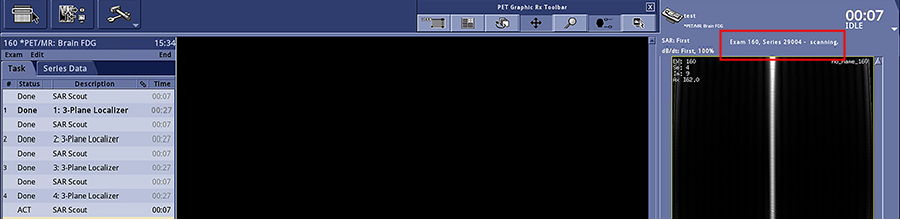
- The SAR Scout series number begins with 29000. It is visible in the Auto View window during SAR scout scans. The system displays the localizer scan series in the Task tab, but it does not display the SAR Scout series.
Figure 1. Workflow manager during SAR Scout scan