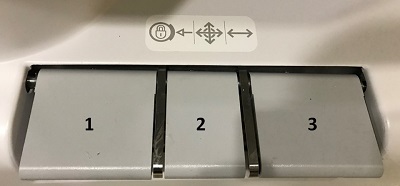
The table is designed to accommodate the transfer of ambulatory, wheelchair, and gurney patients. For table weight specifications details, see Technical specifications.
Warning
Do not bring conventional life-support equipment into the magnet room, because it may contain metal parts and may malfunction or cause patient injury or equipment damage.
CAUTION
Position the patient's limbs, hair, and clothes completely on the table to avoid risk of injury when the table is moving.
Note: The MR magnet is always on even when the system is not acquiring scan data. The only exception to this is if service has ramped down the magnet or it has been quenched.
Step-by-step instructions
Make sure the patient has completed the screening sheet and has removed all metal items.
Bring the patient to the table either in a non-ferrous wheelchair or non-ferrous gurney, or escort the ambulatory patient into the scan room.
Lock the wheels on the transportation device (non-ferrous wheelchair, gurney, mobile table, etc.).
If using a coil, place it on the table.
Step on the Up and Down foot pedals at the magnet end of the table to adjust the table height.
Transfer the patient onto the table.
Help the patient with any medical accessories he or she may have.
Raise the table to scanning height.
Remove any transportation devices (a non-ferrous wheelchairs, gurneys, mobile tables) from the scan room.
To remove the patient from the table, follow these steps:
Bring the patient out of the magnet using the table movement buttons while paying careful attention to all health lines.
Adjust the table height while paying careful attention to all health lines, to safely transport the patient back to a gurney, wheel chair, or to exit the table and walk out of the scan room or prep area.
Bring a transportation device (a non-ferrous wheelchair, gurney, mobile table) into the room, next to the table, and lock the wheelchair or gurney wheels.
Transfer the patient off the MR table and move the transportation device out of the scan room.
To bring the MR detachable table in or out of the scan room to a patient prep area, follow these steps.
Do not move the patient into the magnet with the MR table's IV pole in use. To avoid any pinch points from the MR table's IV pole, remove the IV pole from the table, store it, and use a non-ferrous free standing IV pole.
If the IV pole is connected to the MR table in use, once the table is docked, replace the MR table's IV pole with a non-ferrous free-standing IV pole.
To avoid pinching fingers or hands between the table and other objects, place your hands on the top of the Table Transport bar when moving the table.
Raise the side rails before you move the patient on the table between locations.
Undock the table from the magnet. For docking/undocking, brake/steer-lock caster and table foot pedal details, see:Dock/undock a detachable table
Steer the table to the location where the patient is moved to or from the table.
Step on the brake pedal to lock all wheels to prevent the table from moving during patient transfer.
Adjust the table height to safely transport the patient back to a gurney, wheel chair, or to exit the table and walk out of the prep area.
Once the patient is securely on or off the table, to move the table, step on the neutral pedal.
Results
CAUTION
Following the exam, your patient may need assistance when getting off the table. After lying in a prone position for a length of time, your patient may experience lightheadedness upon sitting up.