- 00000018WIA30C71870GYZ
- id_400253331.4
- Aug 29, 2022 6:58:09 PM
Groups tab
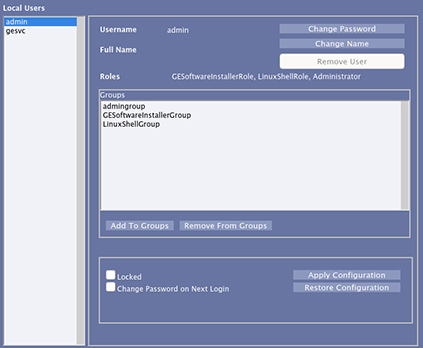
The Groups tab lists all of the groups that are set up on the system. From the Groups tab, each user can be assigned to a group. The members of a specified group will have the privileges that are assigned to that group. You can also remove a user from an assigned group.
When you log in as an administrator to your system, you can access EA3. To view the Groups tab, open EA3 and click Groups to add/remove Local or Enterprise Groups, change group roles, or change group memberships.
Every person who has permission to use the system is a user and each user is assigned to one or more groups. The group to which a user is assigned determines the level of access a user has. Users and groups are set up by system administrators. These administrators may be IT personnel in an enterprise environment, or a site manager or lead tech in standalone environments. For example, a person named Sue Smith could belong to a group called technologists, radiologists, administrators, or any combination.
The group to which a person belongs has privileges. If you do not have an enterprise system, it means that only local users and groups that reside on the machine can log into the system. If your system is set up for enterprise logon, your IT person or administrator will be using more of the features.
- Only one group and user can be in context at a time. If you choose multiple users, the system selects the top user in your selected list. Once a user or group is in context, you can make any necessary modifications to that user or group.
- If there are no users or groups, then there no items in context. All of the buttons in the center panel are disabled until a user or group is added.
- To save the changes, you must click Apply Configuration.
- You cannot select some of the fields and buttons on the Groups tab. The following roles, users, or groups have one or more of these criteria and cannot be modified.
- Roles: limited user, standard user, GE service, administration.
- Users: root, sdc, insite.
For more Groups tab details, see your MR Privacy and Security operator manual.