

- 00000018WIA307D1C80GYZ
- id_20361211.4
- Jun 19, 2022 11:11:43 PM
SAR Management
The Specific Absorption Rate (SAR) is the RF power absorbed per unit of mass of an object and is measured in watts per kilogram (W/kg). The SAR describes how the RF energy that is required to produce the MR signal may heat the patient's tissue.
SAR operating modes
- Low SAR
- Low SAR mode gives users the ability to run the scanner in a safe mode for conditional implanted devices or compromised patients.
- GE recommends using Low SAR mode for scanning patients with MR Conditional implants.
- Allowed Delayed Start is not available in Low SAR mode because it may allow SAR to exceed the limits for MR Conditional implants.
- After you begin the exam, you cannot change from Low SAR to another operating mode.
- Normal Level
- Normal Level mode limits the system to a level that everyone, regardless of health status, should be able to tolerate without physiological stress. Peripheral nerve stimulation (PNS) should be rare in Normal Level mode.
- Unlike Low SAR, you can move from Normal Level mode to First Level mode.
- First Level
- In most cases, First Level mode results in the shortest TE and TR values, with optimum image quality and number of slices per acquisition. At all times, you must carefully monitor patients with impaired thermo-regulatory or cardiovascular systems. Approximately 50% of patients may experience peripheral nerve stimulation.
| Operating mode | Whole Body | Head |
|---|---|---|
| Low SAR | 0.5 – 2.0 W/kg | 0.5 – 3.2 W/kg |
| Normal Level |
|
|
| First Level |
|
|
Workflow: Low SAR
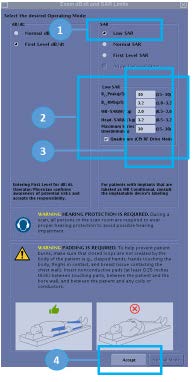
- On the initial setup screen, select the Low SAR radio button (1).
The Low SAR parameters appear (2).
- Use the values from the implant guidelines to update the parameters, as necessary (3).
- Click Accept (4).
Workflow: Normal Level, with or without implant
Note: Refer to your system-specific operator manual for more information on the workflow for your software.
- Ensure that there is no default SAR selected and the Accept button is disabled. (1)
- Determine if the exam includes head or neck scanning or will be on a patient with a head or neck implant. (2) Select the Yes radio button if either condition is true.
If you select Yes, the system directs you to Low SAR mode. (3)
- If you select No, the Accept button is active.Note: For some customers, when Normal SAR mode is selected, there is no longer a prompt regarding an MR Conditional implant. When selecting Normal SAR mode if the patient has an implant, DO NOT select Allow Delayed Start.
Figure 2. Normal SAR 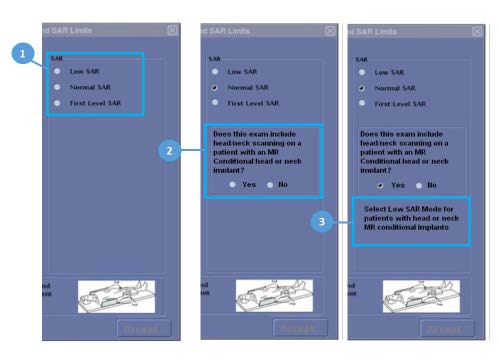
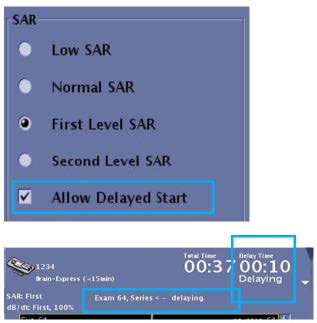
Allow Delayed Start
The Allow Delayed Start option enables and disables the Scan Sequence Time Optimization feature. When enabled, it can decrease overall exam time by allowing a delay before some scans. This allows the system to take full advantage of the 6 minute average for SAR.
- Allow Delayed Start maximizes the system performance short-duration SAR by using 4 w/kg for scans shorter than 3 minutes.
- The user must select Allow Delayed Start at the start of the exam.
- The delay time required prior to next scan is calculated to keep 6 minutes average SAR below the limitation. The duration of the delay is determined based on:
- The most recent scans in the last 6 minutes
- The following scan that is prescribed (in Rx)
- Bore temperatureNote: Allowed Delayed Start is not available in Low SAR mode because it may allow SAR to exceed the limits for MR Conditional implants. GE recommends using Low SAR mode for scanning patients with MR Conditional implants.Note: Allowed Delayed Start is not available to all products.
How to read the SAR Display
| Number | Description |
|---|---|
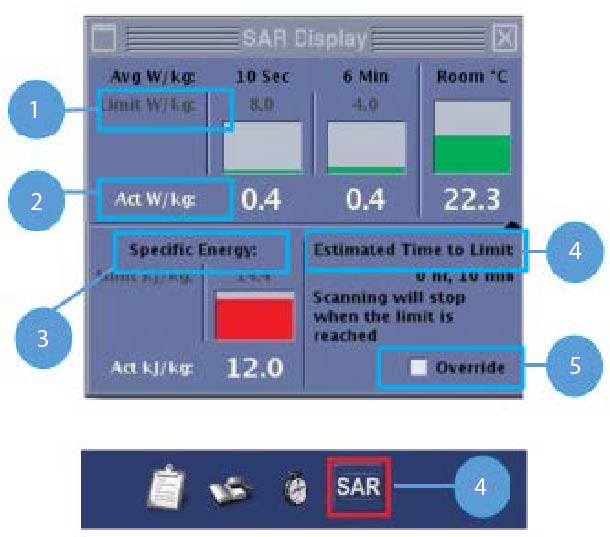
| 1 | Limit W/kg: Regulatory limit for the maximum SAR allowed for the patient. |
| 2 | Act W/kg: The actual accumulated SAR for the patient. |
| 3 | Specific Energy: Cumulative SAR across scans for a patient that has occurred within 2 hours. The value reads 0.0 when the patient has not been scanned during the last 2 hours. Usually, a rest time of 2 hours is required to dissipate the absorbed energy from any previous MR scan.
|
| 4 | Estimated Time to Limit: If this value reads less than or equal to 10 minutes, the SAR icon in the footer area of the UI appears with a red box around it. |
| 5 | Allow override: An override of 14.4 kJ/kg is allowed in Low SAR and Normal modes. Allow override is not allowed in First Level mode. |
Tips and tricks: SAR and First Level mode
- To reduce the possibility of a power monitor trip due to high SAR values, change the order of high SAR series, such as FSE, FLAIR, and SSFSE, with lower SAR series, such as GRE and EPI. This technique is called interleaving. It allows the overall SAR to diminish during lower SAR sequences and reduces the overall exam time.
- When Allow Delayed Start is enabled, it can decrease overall exam time by allowing a delay before some scans. This may result in a delay before some scans.
- During the scan acquisition (not prescan), monitor the 10 sec SAR display. If the 10 sec SAR is exceeding the 6 minute SAR limit and Allowed Delayed Start option is not enabled from the SAR and dB/dt Limits screen, stop the scan and if possible, re-prescribe the protocol with fewer slices or increase the TR. When the Allow Delayed Start option is enabled, it is normal for the 10 second SAR meter to occasionally exceed the 6 minute SAR limit.