About this task
Use these steps to define how the metabolite values are calculated.Step-by-step instructions
- From the spectroscopy Review Steps, click Metabolites.
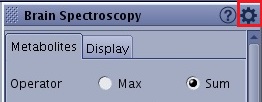
- Click the
 to display additional spectroscopy selections.
 - Click the Metabolites tab.
- From the Metabolites tab, Operator section, Select Max or Sum, which define how the metabolite values are calculated.
Figure 1. Operator section of Metabolites tab
- Max is the maximum point in the range.
- Sum is the sum of the points.
- Adjust the sliders to the desired ppm for each metabolite you want to change.
For example, the temperature setting for the phantom has not been adjusted and, therefore, the metabolite range is offset from the norm.
- Click Save to save your metabolite changes.
- Click Compute to update the metabolite values.
Click Reset or Reset All to return to the original settings or factory settings. Click Save All to save changed selections as the new default values.