

- 00000018WIA3055A870GYZ
- id_400231161.1
- Aug 6, 2021 3:46:41 PM
T1 FLAIR parameter selections
- Scan selections: 2D Mode, Fast Spin Echo family, FSE pulse, T1 FLAIR Imaging Option.
- Auto TI: It is available to automatically calculate the optimum TI value as the TR, slice thickness and spacing vary. Use Auto TI for consistent CSF suppression.
- Auto TR: Automatically selects the optimum TR and TI for CSF suppression, optimum gray/white matter contrast, and shortest scan time. Note that when Auto TR is selected, Auto TI locked On.
- FOV: If the FOV is ≤ 16 and the Slice Thickness is ≤ 5, the ESP may increase and there may be fewer slices per acquisition.
- NEX: If an odd NEX is selected, it may (although unlikely), result in reduced spatial resolution in comparison to the same scan parameters with an even NEX.
- Pause: Pausing a FLAIR acquisition during scanning may cause image artifacts and should be avoided.
- Slice/Slab: There is a variation in the signal intensity of a T1 FLAIR acquisition when the slice spacing is less than the slice's thickness. This may result in a decrease in signal on the first and last slice, or every other slice may vary in signal intensity. To avoid this problem set the slice spacing to equal the slice thickness or use the Interleave option on the slice spacing menu. Using Interleave doubles the scan time.
- TI: When performing a T1 FLAIR with contrast, if the T1 shortening of contrast corresponds to the null point of the enhancing lesion, contrast enhancement could be suppressed. Note the differences in lesion enhancement on the sagittal T1 cervical spine images shown below.
Figure 1. Spine image comparison: T1 FLAIR (left) and Spin Echo (right) 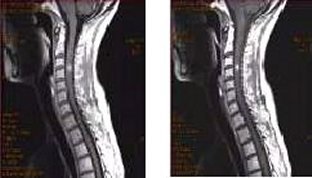
Sagittal T1 FLAIR ASSET artifact
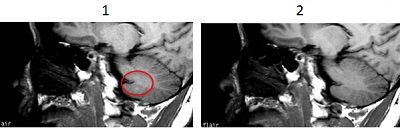
An aliasing ASSET artifact can occur on sagittal T1 FLAIR scans when phase encoding is in the typical Anterior/Posterior direction. In general, turn off ASSET when acquiring sagittal T1 FLAIR scans; the non-ASSET acquisition time penalty is minimal and the SNR is improved.
| # | Description |
|---|---|
| 1 | ASSET Imaging Option turned on. |
| 2 | ASSET Imaging Option turned off. |