

- 00000018WIA30BCE870GYZ
- id_400267271.3
- Jan 12, 2022 2:26:56 PM
RF Drive Modes: Quadrature (CP) and Preset
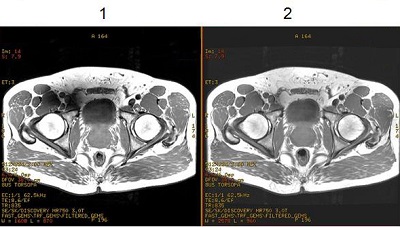
| Number | Description |
|---|---|
| 1 | Image with RF Drive set to Quadrature (CP) mode. |
| 2 | Image with RF Drive set to Preset mode. Note the improved homogeneity. |
- The RF Drive Mode option is only available on 3.0T systems.
- Available with multi-station exams.
- Dual Drive RF modes Optimizer and Preset are available for both head and body scans based on supported coils.
- If the coil is not supported for Preset mode, then use Quadrature (CP) mode.
- The RF Drive Mode is selected from the Details screen. To view the Details screen, click the
 of the Scan Parameter screen.
Quadrature (CP) mode
- From the RF Drive Mode menu, select Quadrature (CP) when scanning patients with MR Conditional metal implants or devices.
Figure 2. RF Drive Mode menu 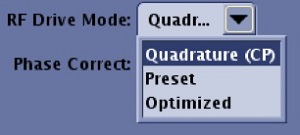
- From the Exam dB/dt and SAR Limits screen: when Low SAR mode and the Quadrature (CP) checkbox are selected, RF Drive Mode is locked to Quadrature (CP) mode for the duration of the exam (the pull-down menu is grayed out and cannot be selected).
Figure 3. Exam dB/dt and SAR Limits screen 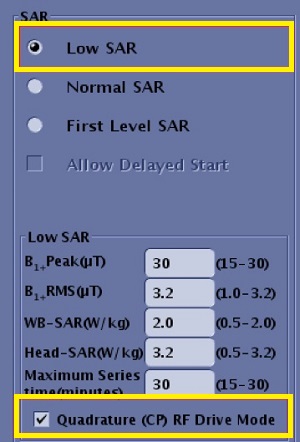
- Use Quadrature (CP) mode with brain exams and when Preset is not available.
- Quadrature (CP) mode is the only RF drive mode compatible with decubitus scan plane.
- Some service tools only use Quadrature (CP) mode.
- Amplitude Attenuation and Phase Delay manual prescan RF Drive Settings are automatically displayed as 0 and 0. The text boxes are disabled.
Preset mode
| Warning | |
|---|---|
- Preset mode is the default mode and the most common RF Drive mode selected because it results in the best homogeneity and image quality.
- Typically use the Preset mode whenever possible.
- Amplitude Attenuation and Phase Delay manual prescan RF Drive Settings automatically display a fixed value. The values are optimized and dependent on the supported coil mode.
Figure 4. Example of Manual Prescan RF Drive Settings for a typical body scan 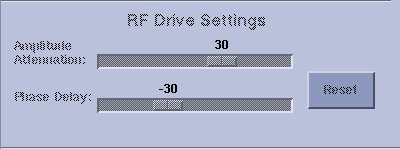
- The Phase Delay value affects image quality. For brain imaging, patients with a more round shaped head tend to have better image quality when the Phase Delay value is smaller. Patients with a more elliptical shaped head tend to have better image quality when the Phase Delay value is larger. The Amplitude Attenuation and Phase Delay values for RF Drive Mode Preset are optimized for the average demographic head shape. It is suggested to use Preset mode to improve image quality. The image quality improvement using Preset mode, compared to Quadrature (CP) mode, may vary among patients.
- Always check the RF Drive Mode selection, to verify that the protocol applies the desired mode.