

- 00000018WIA303CE870GYZ
- id_400267471.2
- Apr 5, 2022 3:56:59 PM
Real Time Center Frequency
The Real Time Center Frequency option is only available with DW-EPI scans and DTI scans (DW-EPI scans with Tensor selected as the Diffusion direction). Real Time Center Frequency applies the optimal center frequency for each slice.
The Real Time Center Frequency option is located on the Details tab for DWI and DTI scan prescriptions.
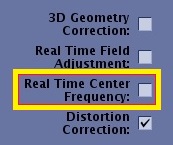
Real Time Center Frequency is used for the following:
- To improve fat suppression in areas of high B0 inhomogeneity (off-isocenter, or area with high tissue susceptibility).
Figure 2. Real Time Center Frequency on/off affects on fat suppression 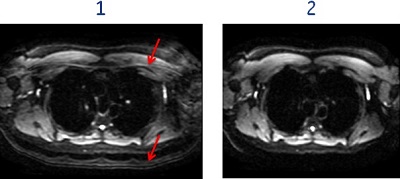
Table 1. Image legend Number Description 1 Image acquired with Real Time Center Frequency option turned Off. The arrows indicate the area of poor fat suppression.
2 Image acquired with Real Time Center Frequency option turned On. Note the improved fat suppression. - To reduce signal drop-off in areas of high B0 inhomogeneity (off-isocenter, or area with high tissue susceptibility).
- For improved image quality in the neck and shoulder region, and to reduce signal drop off in the spine area, follow this recommendations:
- Apply one rectangular or two square shim volumes to cover the spinal cord region.
Figure 3. Real Time Center Frequency on/off affects on signal drop-off 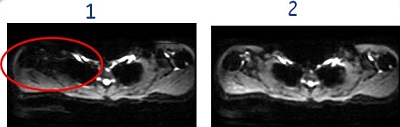
Table 2. Image legend Number Description 1 Image acquired with Real Time Center Frequency option turned Off. The circle indicates the area of signal drop-off.
2 Image acquired with Real Time Center Frequency option turned On. Note the reduced signal drop-off.
- Apply one rectangular or two square shim volumes to cover the spinal cord region.
- To reduce station-to-station misalignment in whole body diffusion imaging.
Figure 4. Real Time Center Frequency on/off affects on station-to-station alignment 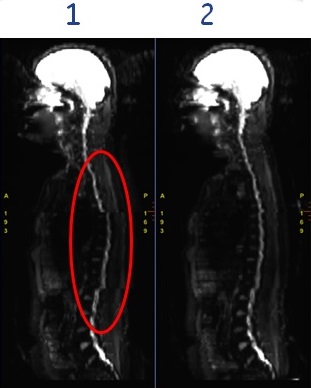
Table 3. Image legend Number Description 1 Image acquired with Real Time Center Frequency option turned Off. The circle indicates the area of poor alignment.
2 Image acquired with Real Time Center Frequency option turned On. Note the improved station-to-station alignment.
Considerations
- When Real Time Center Frequency (RTCF) is turned on, the scan time increases by approximately 1 TR (plus 1-2 second for various pulse sequence computation time and wait time). The first TR is used to estimate the center frequencies for each slice.
- Real Time Center Frequency option is not compatible with the following:
- Focus Excitation Mode
- DWI and DTI scans with no ASSET Imaging Option and when the FLAIR Inversion User CV is turned On.
- HyperBand Imaging Option
- Navigator Imaging Option
- When non-axial (including non-axial oblique) scan planes are selected
- Single channel coils such as the Body coil
- When breast anatomy is selected from Anatomical Region.
- Real Time Center Frequency option is grayed out under the following conditions:
- IR Prepared Imaging Option is selected or,
- Fat Sat is selected from the Chem SAT menu on the Scan Parameter screen, and,
- Enhanced Fat Suppression User CV is set to 0. If you set Enhanced Fat Suppression to 1 or 2, then the Real Time Center Frequency option becomes available.