

- 00000018WIA303DA870GYZ
- id_400213571.4
- Mar 31, 2022 11:31:01 AM
Types of paradigms
The fMRI data can be acquired with a single-shot EPI pulse sequence used in conjunction with a clinical paradigm to visualize signal intensity changes during task activation. During the acquisition, your patient performs a pre-determined task, called a paradigm. The paradigm is performed for a given period of time, 24 seconds for example, followed by a rest period of equal length. This task and rest (sometimes called task ‘on’, task ‘off’) procedure is repeated for eight cycles and usually is performed with the aid of various sensory equipment. As your patient performs task activation with the prescribed paradigm, the blood oxygen levels in the brain increase and are seen as signal intensity changes on the images. You are able to use Hardware or Software paradigms to acquire the fMRI task activation data.
Software paradigms
Software paradigms are those paradigms which are created directly on the system.
Software paradigms are task-activation procedures. You need to ensure the proper stimuli is being presented to the patient. Several standard software paradigms are available, including Left Motor and Right Motor paradigms. You may also build custom software paradigms from the BrainWave fMRI scan screens. The simple block paradigm is standard. The Complex Bock, Free Form, and Event Related paradigms are optional.
Hardware paradigms
Hardware paradigms are those paradigms you create with Paradigm Studio and import to run on the system. Instruct your patient before the examination on which paradigm to perform during the task activation and control periods.
It is necessary to prepare your patient for each paradigm. Suggestions of what you might say to prepare your patient are provided in the description of each paradigm.
Voluntary hand movement (left or right hand)
There are two paradigms associated with Voluntary Hand Movement: Left Hand Movement and Right Hand Movement. Each paradigm results in a task that produces signal intensity changes in various parts of the motor system, such as the SMA, contralateral primary motor cortex, cingulate motor area, and ipsilateral cerebellar cortex.
During this paradigm, your patient sees a cross-hair through the glasses, which periodically appears surrounded by a circle. This circle appears at the rate of once per second. Every time your patient sees the circle, either the left or right button is pressed depending on which hand movement paradigm is selected. If your patient presses both buttons when the circle appears, the response is counted as an error.
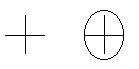
The following example demonstrates how you can prepare your patient to perform the Right Hand Movement paradigm.
“Hold the boxes in both your hands. Look into the glasses. You should see a cross-hair. Keep your eyes on the cross-hair. Whenever you see a circle appear around the cross-hair, press only the right button once. If no circle is seen around the cross-hair, do not press any buttons. Try to keep your head as still as possible throughout the scan.”
When performing Left Hand Movement paradigm, substitute the left button for the right button in the above example.
Passive listening
The Passive Listening paradigm is the easiest of all the paradigms. It is intended to activate signal intensity changes in Wernicke’s area, which represents the receptive language area. This paradigm only requires the patient to listen.
During this paradigm, your patient wears headphones and listens to a narration of English text for 24 seconds. For the next 24 seconds, your patient hears gibberish, which is the English narration played backwards. While the narration is playing, your patient should lie still and carefully listen. You should not tell your patient what is happening, nor should they try to make any sense of it.
The following example demonstrates how you can prepare your patient to perform the Passive Listening paradigm.
“For this test, all you need to do is to hold your head still and carefully listen as the recording plays. Do not try to understand the gibberish, because it will not make any sense.”
Verb generation
The Verb Generation paradigm is intended to activate signal intensity changes in Broca’s (Brodmann’s 45) area of the brain, which represents expressive language.
During this paradigm, your patient sees words in the form of nouns through the glasses. He or she should think of an action word, in the form of a verb associated with the word seen. It is important to tell your patient not to say the words aloud, only think the words.
The following example demonstrates how you can prepare your patient to perform the Verb Generation paradigm.
“For this test it is very important you lie still. Through these glasses you should see a cross-hair. While looking at the cross-hair, try not to think of anything. When the cross-hair disappears, it is replaced by a word. Try to think of an action word associated with the word. For example, if you see the word ‘book,’ you might think of the word ‘read.’ It is important that you only think the word silently and NOT say the word out loud. A new word appears every few seconds. Remember to silently think of the action words.”
Rhyming
The Rhyming paradigm is designed to produce signal changes in the areas of the brain responsible for phonologic processing. These areas of brain activation are similar to those areas activated by the Verb Generation paradigm, although the Rhyming paradigm activated areas are more specific.
This is a difficult task to perform. Not all patients are able to effectively complete this task.
During this paradigm, your patient sees two words in the glasses. If the two words rhyme, your patient presses the right button. If the two words do not rhyme, your patient presses the left button. Your patient should only press one button per word pair. Pressing both buttons at the same time is counted by the system as an error.
Your patient also sees two rows of five sticks and determines whether the two rows are identical. If the two rows are identical, your patient presses the right button. If the rows are not identical, the left button is pressed. The button needs to only be pressed once to make a selection.
The following example demonstrates how you can prepare your patient to perform the Rhyming paradigm.
“For this test, it is important to keep your head very still. Hold the controls in both hands and look into the glasses. At times, you will see a pair of words, which changes every few seconds. Whenever you see a pair of words that rhyme, press the right button once. If the words do not rhyme, press the left button once. Remember, the right button is for rhyming words.
At other times during this test, you will see two rows of five sticks. Whenever the rows of sticks look identical, press the right button once. If the rows are not identical, press the left button once. Sometimes the differences are subtle, so look carefully. Both the words and the sticks change every few seconds.”
Semantic decision
The Semantic Decision paradigm is the most challenging of all previously mentioned paradigms. It is sometimes called the Animal paradigm and is designed to activate signal intensity changes in the areas of the brain responsible for semantic processing.
This is a fairly difficult task to perform. Not all patients are able to effectively complete this task.
During this paradigm, your patient hears the names of various animals. If the animal is both native to the United States and commonly used by humans, your patient presses the right button. Animal characteristics include animals used for hunting, as a pet, or for domestic purposes. It excludes zoo-kept animals. If the animal is not native to the United States or is not commonly used by humans, the left button is pressed. If both buttons are pressed, the system records the response as an error.
At other times during this test, your patient hears a series of tones or beeps, each lasting approximately one second. If exactly two tones are heard during the series, your patient presses the right button once. If more or less than two tones are heard during the series, your patient presses the left button once.
The following example demonstrates how you can prepare your patient to perform the Semantic Decision paradigm. Make sure you allow enough time to thoroughly prepare your patient for this test, as the tasks are more challenging than any other paradigm.
“For this test, hold the controls in both hands and look into glasses. You should see cross-hairs in the glasses but nothing else appears. Through your headphones, you sometimes hear the names of animals. Whenever you hear the name of an animal that is both commonly used by humans and a native to the United States, press the right button once. If this animal is not common to the United States or not used by humans, press the left button once. You will hear the names of new animals every few seconds.
At other times during this test, you will hear a series of beeps. Whenever you hear a set of beeps that contains exactly two tones, press the right button once. If more or less than two beeps are heard, press the left button once. You will hear a new series of beeps every few seconds. Keep your eyes fixed on the cross-hairs and remember to hold your head as still as possible throughout the scan.”
Calibration training
The Calibration Training paradigm is a testing paradigm. It can be used to help prepare your patient for an fMRI procedure, and to verify the paradigm delivery system is functioning properly. Alphabets are displayed through the glasses and an audio sound sample is transmitted through the headphones.
Software paradigms
Software paradigms are task-activation procedures. You need to ensure the proper stimuli is being presented to the patient. Several standard software paradigms are available, including Left Motor and Right Motor paradigms. You may also build custom Software paradigms with the Paradigm Manager.
In the absence of delivery hardware, it is your responsibility to decide how to instruct the patient before, during, and after the fMRI series (i.e., use a patient intercom or tap the patient’s leg when he or she should start or stop a paradigm task.
fMRI scan
Functional MRI uses a modified version of the SS-GRE EPI pulse sequence. The sequence is acquired in the same manner as a conventional SS-GRE EPI sequence and employs several fMRI Additional Parameters and fMRI User CVs. The sequence must also include the fMRI option. Once this option is selected, the fMRI Details tab can be viewed.
The total number of images = [(# of active images) + (# of control images)] × (# of total cycles) × (number of scan locations). For example, if your paradigm has 10 active and 10 control samples with 5 cycles and 40 locations, there will be 4000 images acquired. (10 +10)×5×40 = 4000.