

- 00000018WIA306EB770GYZ
- id_400243311.0
- Jun 17, 2021 11:06:17 AM
Link series procedure
The Workflow Manager allows you to link or share parameters between two different tasks.
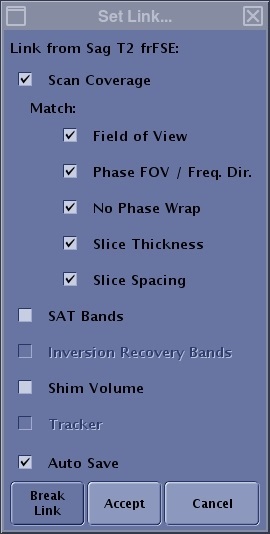
| Parameter | Description |
|---|---|
| Scan Coverage | Matches the scan coverage between the linked series. Note that if the selected series does not support the scan coverage option, it is not selectable. |
| Match | Matches the selected options of Frequency FOV, Phase FOV/Freq Dir, No Phase Wrap, slice thickness and spacing between the linked series. |
| SAT Bands | Matches the SAT bands between the linked series. |
| Inversion Recovery Bands | Matches the IR bands between the linked series. |
| Shim Volume | Matches the shim volume between the linked series. |
| Tracker | Matches the tracker between linked series. |
| Auto save | When Auto Save is selected and the first series has been Setup and Save Rx is selected, then the linked series is automatically changed to an RXD state. This means that you can simply select the series and click Scan to initiate the acquisition on the linked series or the scan will automatically start if Auto Scan is on. |
| Break Link | Breaks the link between selected series. |
| Accept/Cancel | Accepts the Set Links selections.
Cancel closes the Set Links screen without applying the selections. |
You can link the following:
- A source task that supplies parameter values to a destination task.
- A destination task that receives parameter values from a source task.
- A task link which is a link between two tasks. It exists because of one or more parameters have been linked between the tasks.
- A parameter link that is linked between two tasks.
- Once a link has been created, the link column displays the series representing the linkage.
Linking allows you to link scan coverage, SAT bands, shim volume, and scan range parameters from one series to another if the series meet the following criteria: orthogonal to matching orthogonal (axial to axial), orthogonal to oblique, multi-slab to single slab, etc. Linking is